RCSearch
  • Submit registration
  • Login
Join to our channels: new products, coupons, best deals:

Multirotors

Tinywhoops
FPV Racing drones
X-Class Racers
RTF / PNF / ARF
Multirotor frames
Flight Controllers
Motors & Accessories
Propellers
Camera Gimbals
Lighting Accessories
Protective Carry Case
Electronics
Ideafly
Brand Drones
GPS Modules
Foxeer M10Q 250 V2 GPS U-Blox M10050 IST8310
HGLRC M100-Pro GPS module
Radiomaster ERS-GPS Sensor for ELRS PWM Receivers
DarwinFPV GM8 GPS / GLONASS / BEIDOU module for Anti-Interference Drone
SEQURE M10-12 GPS module
Sub250 M10 GPS module
GEPRC GEP-M1025 GPS module
GPS Antennas
LIDARs & Optic Flow
Landing Pad
Agricultural UAV
RC FPV in winter
Multirotors
FPV
Helicopters
Remote Controllers
Airplanes, aircrafts, flying wings
Battery Chargers
Batteries
Robots
Electronics
Boats
RC Cars
Brands
Fasteners
Fun Club & Merch
DJI
Backpacks & Cases
Workbench
Arduino World

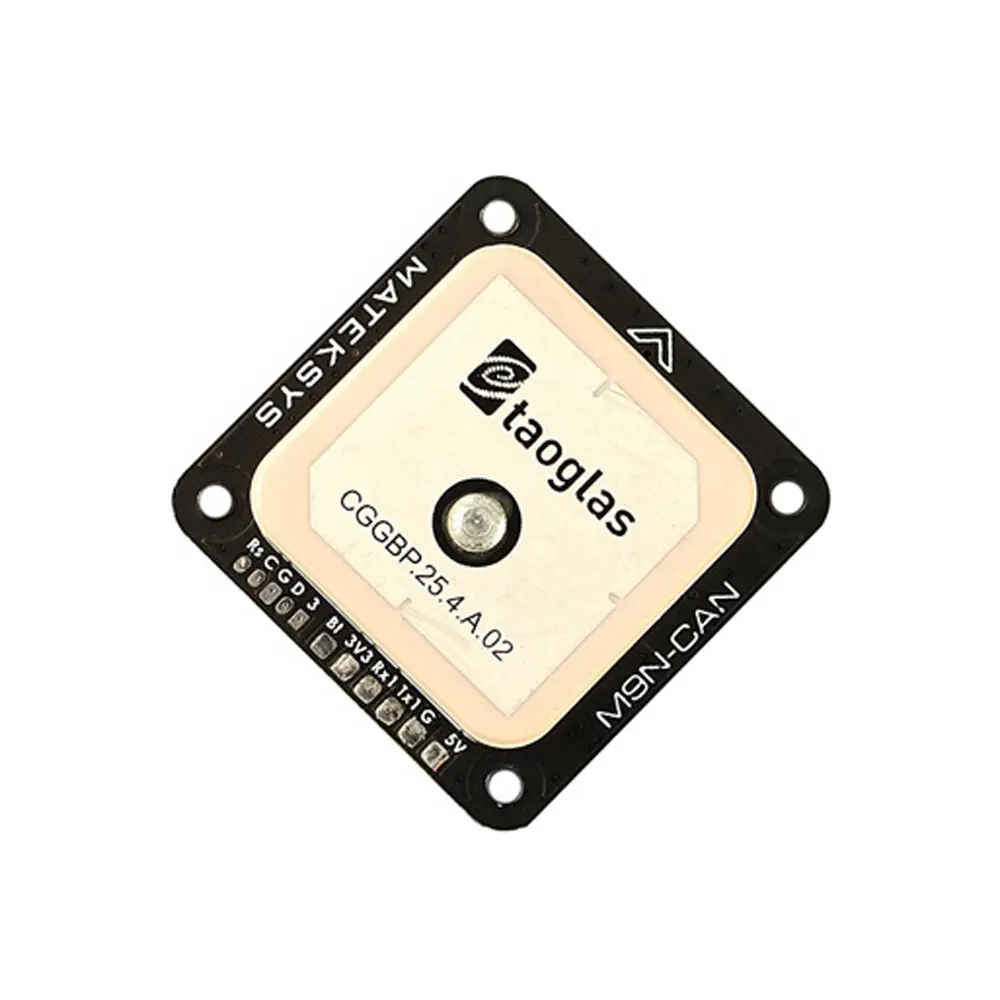
Matek M9N-CAN GNSS (GPS, GLONASS, Galileo and BeiDou) UAVCAN & MSP

Multirotors → GPS Modules → Matek M9N-CAN GNSS (GPS, GLONASS, Galileo and BeiDou) UAVCAN & MSP
Matek M9N-CAN GNSS (GPS, GLONASS, Galileo and BeiDou) UAVCAN & MSP

GNSS M9N-CAN, UAVCAN & MSP

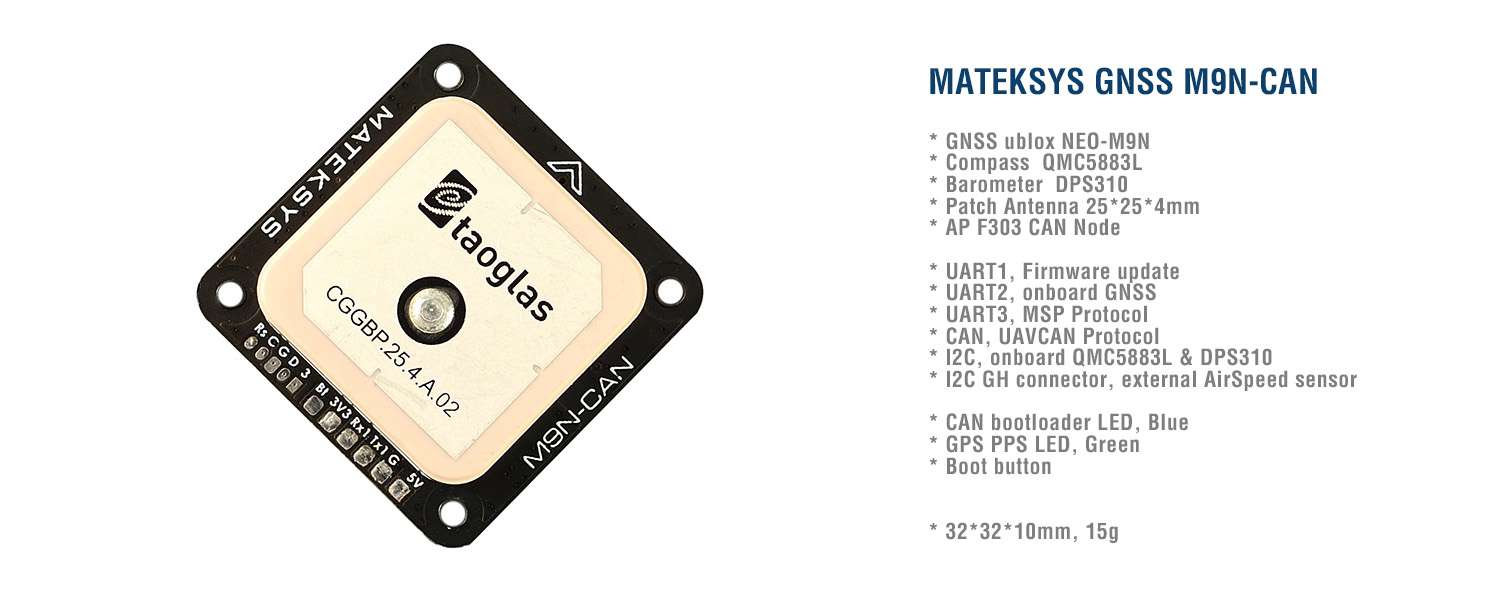
AP F303 CAN node, NEO-M9N, QMC5881L, DPS310, I2C, UART1 & UART3 breakout. UAVCAN protocol & UART_MSP

Gallery

Specifications
  • M9N-CAN is based on ArudPilots’ AP_Pheriph firmware, It is a GNSS+COMPASS+BAROMETER peripheral with CAN/UAVCAN and UART/MSP interfaces to the autopilot, plus an I2C expansion bus for additional peripherals, such as airspeed sensors.
  • M9N-CAN uses multi-constellation GNSS powered by u-blox NEO-M9N , NEO-M9N is a concurrent GNSS receiver which can receive and track multiple GNSS systems. Owing to the multi-band RF front-end architecture all four major GNSS constellations, GPS,Galileo, GLONASS and BeiDou can be received concurrently.

Specifications

  • GNSS u-blox NEO-M9N (GPS, GLONASS, Galileo and BeiDou)
  • Magnetic Compass QMC5883L
  • Barometer DPS310
  • ArduPilot AP_Periph F303 CAN node
  • UART1, Firmware update
  • UART2, onboard NEO-M9N
  • UART3, MSP Protocol
  • CAN, UAVCAN Protocol
  • I2C, onboard QMC5883L & DPS310
  • I2C JST-GH connector, external AirSpeed sensor
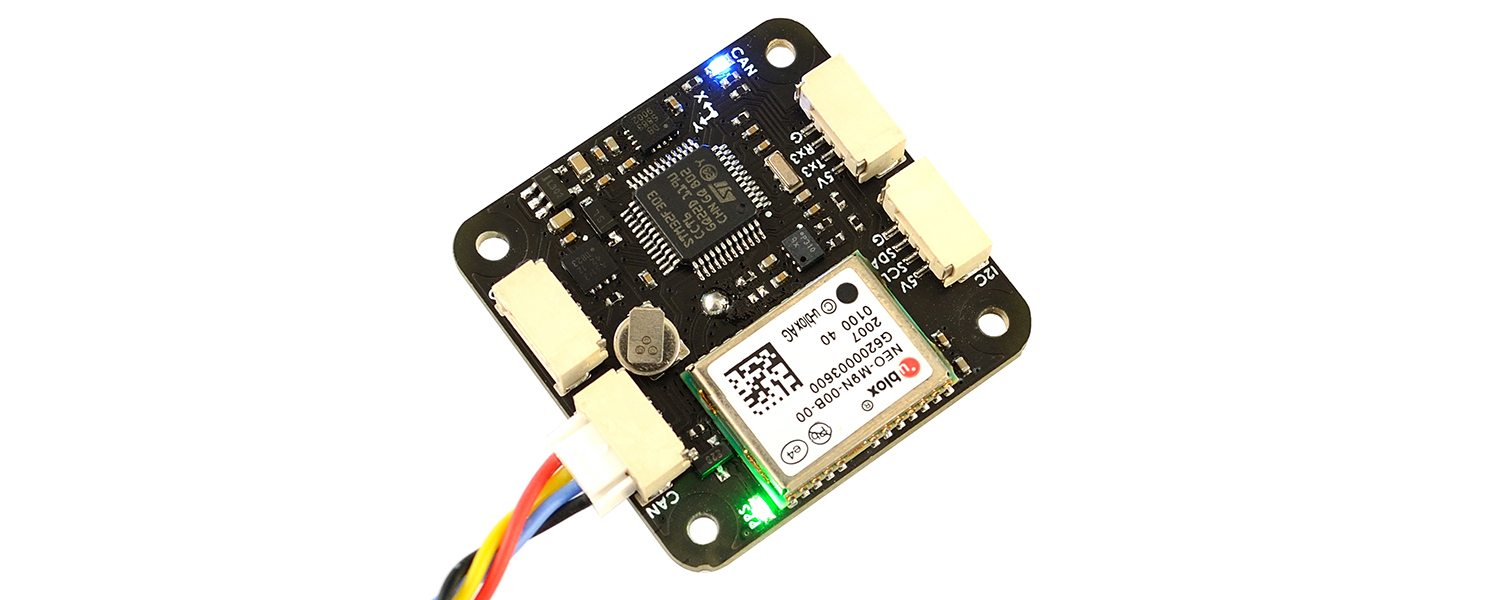
  • CAN bootloader LED, Blue
    • Fast blinking, No communication between CAN node and Flight Controllers
    • Slow blinking, Communicating between CAN node and Flight Controllers
  • GNSS PPS LED, Green
    • blinking(1Hz) when GNSS has 3D fixed
  • Input voltage range: 4~6V (5V pad/pin)
  • Power consumption: 100mA
  • Operating Temperatures: -20~80 °C
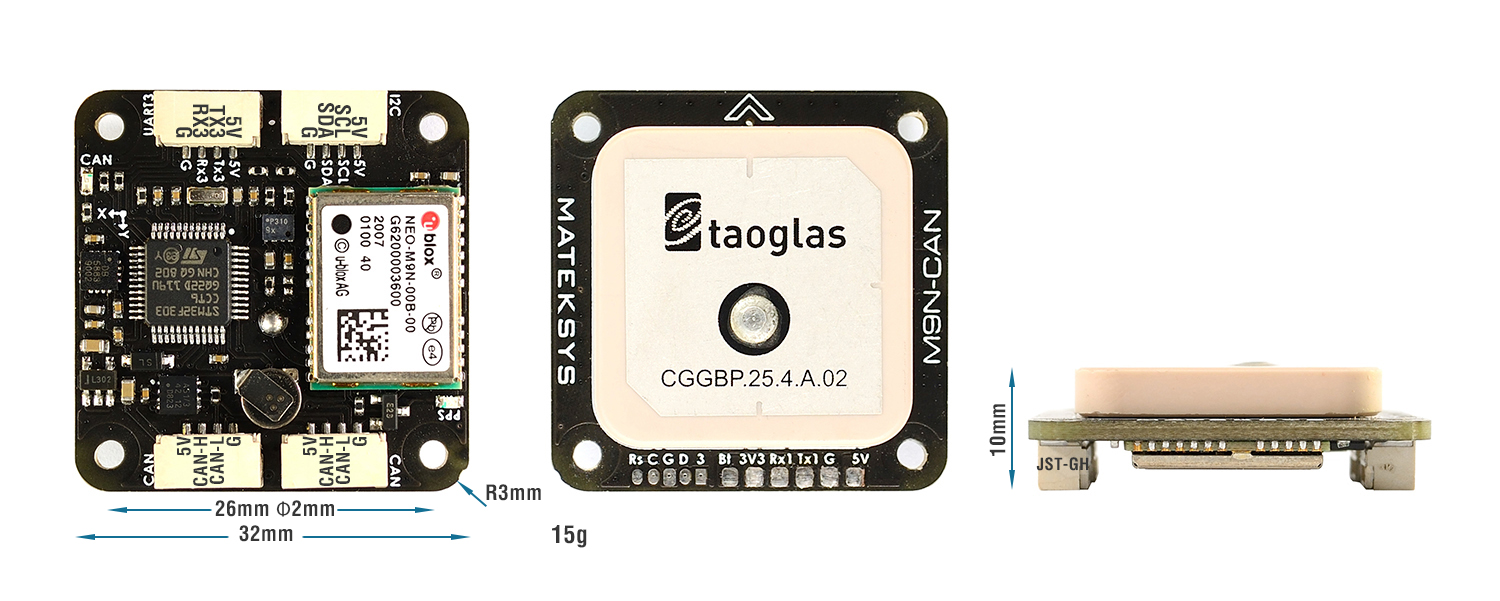
  • 32mm*32mm*10mm
  • 15g

Includes

  • 1x M9N-CAN
  • 2x JST-GH-4P to JST-GH-4P 20cm silicon wire

Tips

  • Compass Alignment(Arrow forward and flat mounting):
    Ardupilot/Mission Planner: Rotation None
  • Make sure to have compass/magnetometer 10cm away from power lines/ESC/motors/iron based material
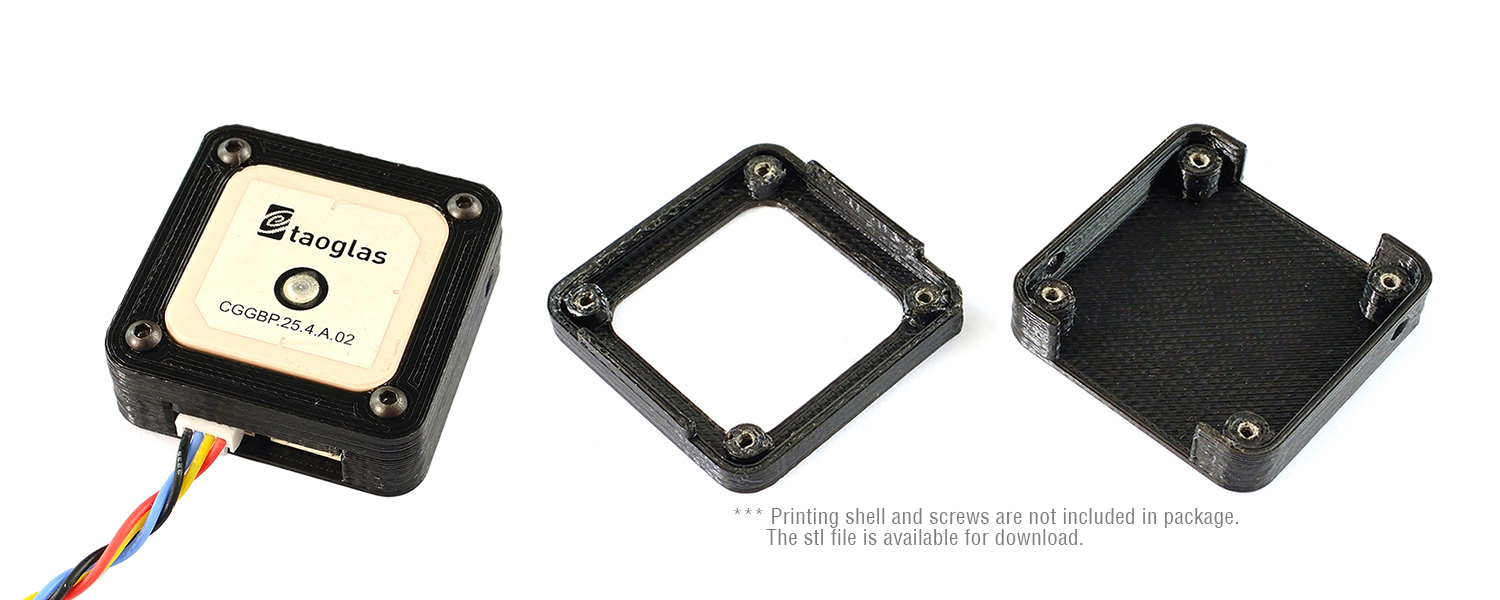
  • The scratches on ceramic antenna are the result of tuning the antenna.
Pinout & Pads

Pinout & Pads

GH-4P Pin Signal Wires color Pads Signal
5V 4~6V input Red 3V3 onboard LDO output
C-H CAN high Yellow 5V 4~6V input
C-L CAN low Blue G GND
G GND Black Tx1 UART1-TX
Rx1 UART1-RX
5V 4~6V input Red Rs F303 NRST
SCL I2C-SCL Yellow C F303 SWCLK
SDA I2C-SDA Blue G GND
G GND Black D F303 SWDIO
3 onboard LDO output 3.3V
5V 4~6V input Red Bt F303 Boot pin
Tx3 UART3-TX Yellow
Rx3 UART3-RX Blue
G GND Black
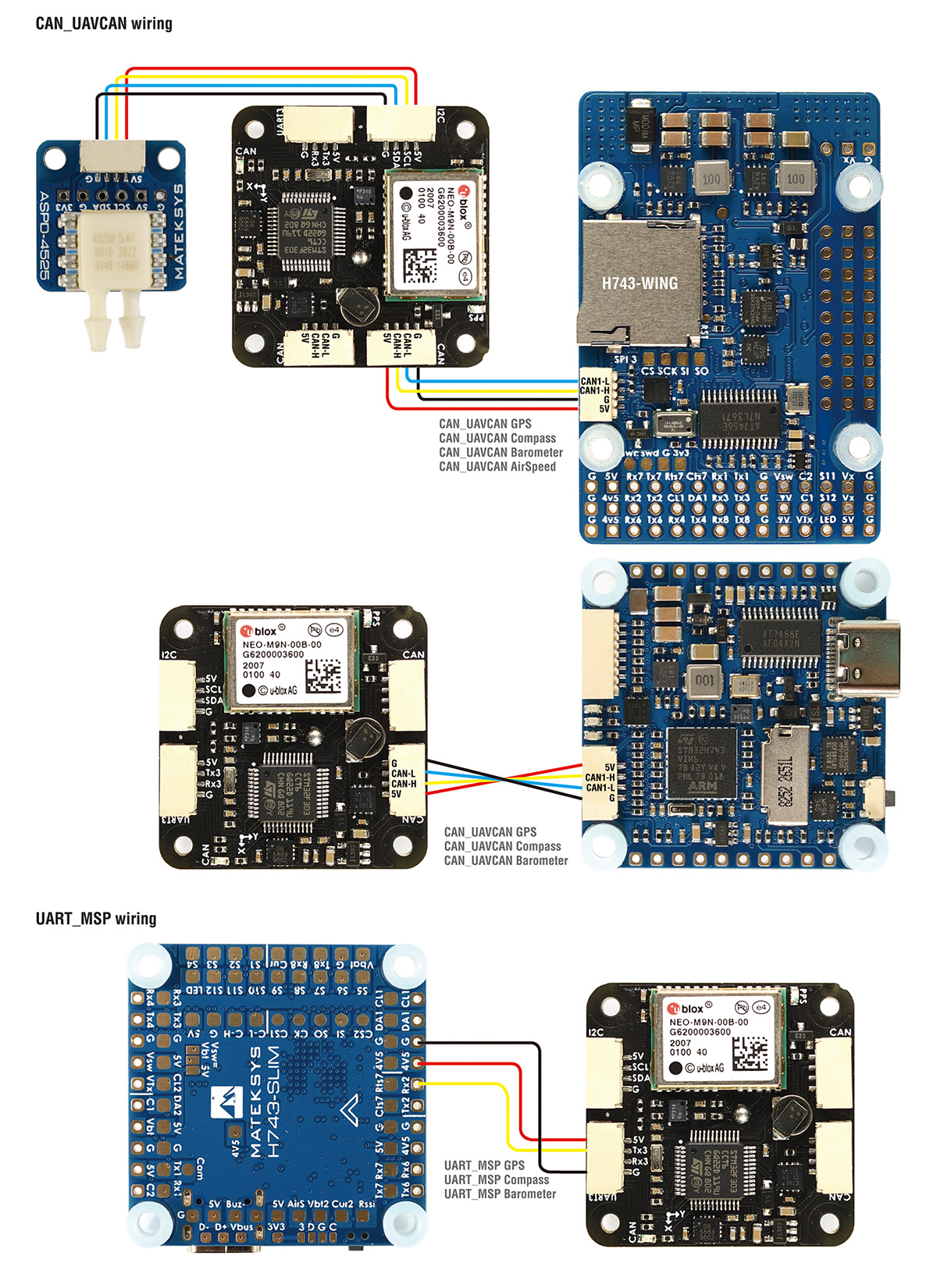
Wiring

UAVCAN Parameters

UAVCAN Parameters

  • CAN_D1_PROTOCOL -> 1
  • CAN_P1_DRIVER -> 1
  • GPS_TYPE -> 9 (UAVCAN)
  • COMPASS_TYPEMASK -> 0 (make sure UAVCAN Unchecked)

If you connect I2C airspeed sensor to I2C port of M9N-CAN

  • ARSPD_TYPE -> 8 (UAVCAN)
  • ARSPD_USE -> 1

And you must set CAN Node parameters for airspeed sensor connected to I2C port of M9N-CAN

Mission Planner > Initial Setup > Optional Hardware > UAVCAN > SLCan Mode CAN1 > Parameters

  • MS4525 ARSP_TYPE -> 1
  • MS5525 ARSP_TYPE -> 3 supports MS5525 with address 0x77 only
  • SDP3X ARSP_TYPE -> 6
  • DLVR-L10D ARSP_TYPE -> 9 (default in hwdef)
  • Write and reboot
MSP Parameters
ArduPilot (latest firmware after Sep.09)
  • Serialx_PROTOCOL = 32 (MSP) where x is the SERIAL port used for connection on autopilot.
  • GPS TYPE = 19 (MSP)
  • GND_PROBE_EXT = 4096 (MSP Baro)
  • GND_PRIMARY = 1 (If you want to use MSP baro as primary baro, otherwise leave as default)
  • COMPASS_TYPEMASK 0 (make sure MSP bit is not checked)
INAV (since 2.6)
  • In ports tab, Enable MSP on corresponding UART that M9N-CAN connected
  • feature GPS
  • set gps_provider = MSP
  • set mag_hardware = MSP
  • set baro_hardware = MSP
STL and STEP

M9N-CAN_step.zip

M9N-CAN_shell_STL.zip

Update Firmwares
  • ArduPilot hwdef f303-MatekGPS

    https://ardupilot.org/copter/docs/common-matek-m8q.html

  • Firmware https://firmware.ardupilot.org/AP_Periph/latest/f303-MatekGPS/


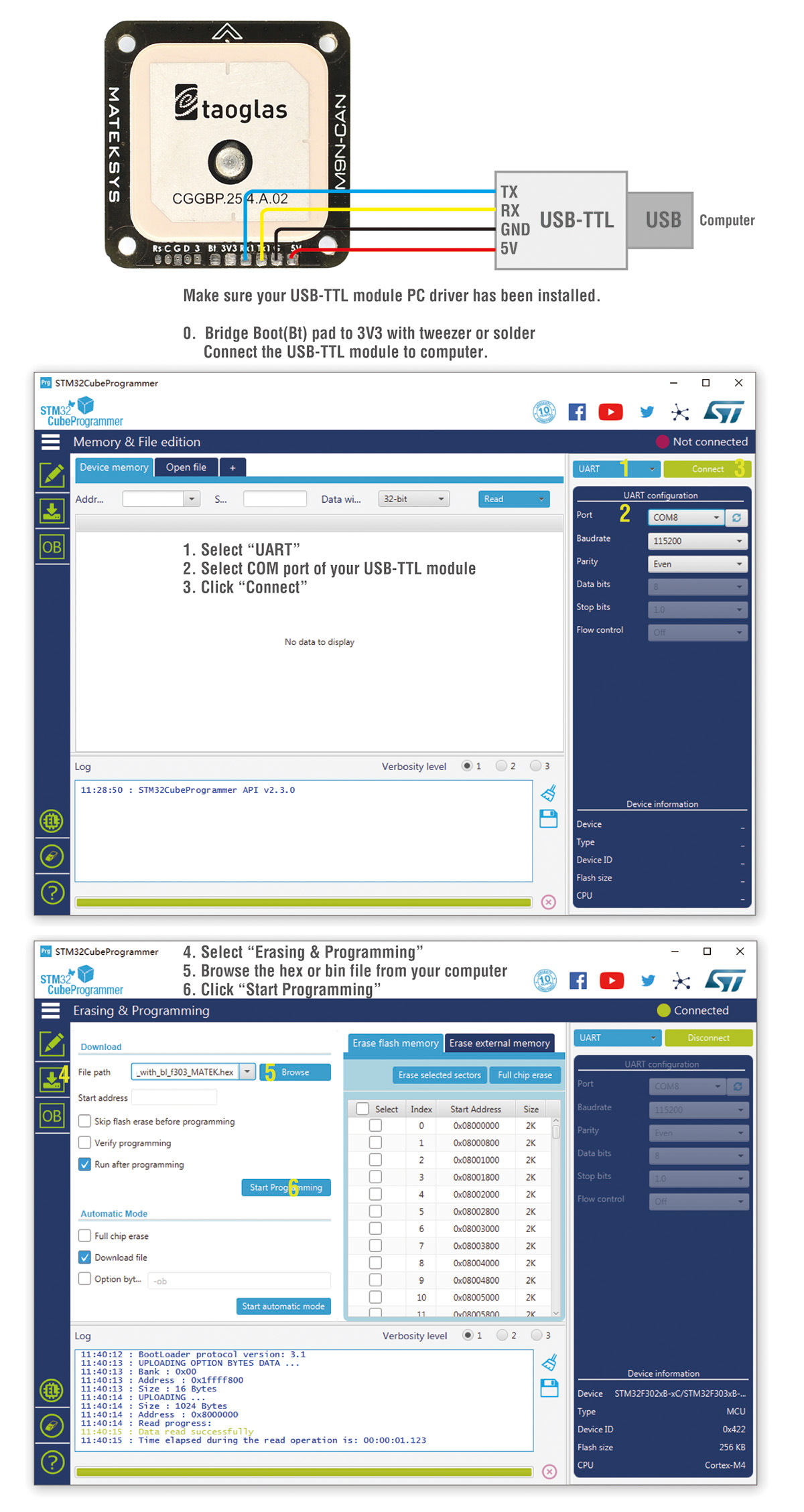
1. Update firmware in STM32CubeProgrammer with “AP_Periph_with_bl.hex”

Tool https://www.st.com/en/development-tools/stm32cubeprog.html

You may download it from our server en.stm32cubeprog_v2-3-0.zip

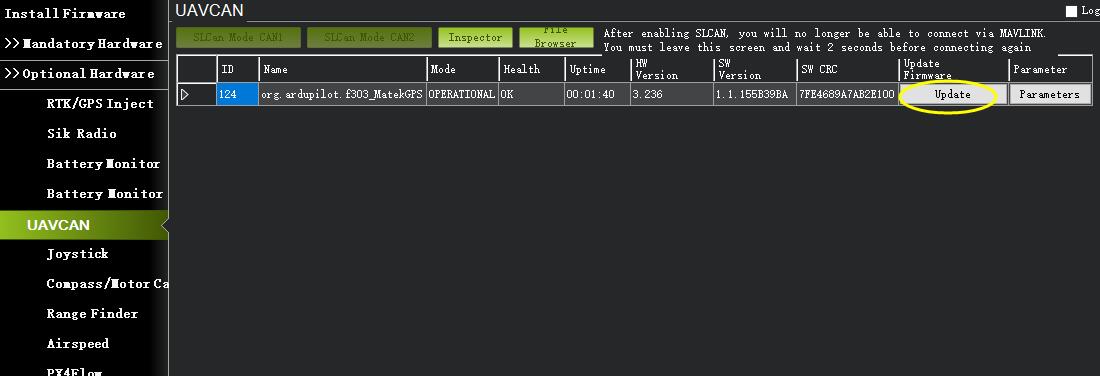
2. If you have a flight controller with CAN port, you can connect M9N-CAN to Flight controller via CAN, then update firmware in Mission Planner with “AP_Periph.bin”

Resellers
  • MSRP: USD54.99
  • ETA: End Oct.
Share

Prices for Matek M9N-CAN GNSS (GPS, GLONASS, Galileo and BeiDou) UAVCAN & MSP in stores

Deals found: 14 ()

See also

GPS Modules
GPS Modules
Join to our channels: new products, coupons, best deals:
Copyright © 2011—2025 | RCSearch.info | Manych project
↑